Live captions & translation for churches
Live Translation
& Captions for
Churches
Turn church audio into live captions and multilingual sermon translation. Your congregation follows on their own phones, with no viewer app required.
No card required.
- No viewer app required
- Unlimited viewers
- 60 language choices, flexible translation slots
 Română
Source: English
How it works
From the sound desk to every phone.
Set up your church once, connect a clear speech feed to the Windows or macOS Operator app, then share captions and translation through a reusable viewer link. Read the church captions setup guide.
Connect your audio
Choose the audio input receiving speech from your church sound system.
Start translating
Choose your speaker language and the translation languages needed for this service from 60 supported choices.
Share one link
Display the church QR code or reusable viewer link. People open it on their own phone and choose an available language.
Language slots that suit your service
60 languages for live translations.
Paid use includes source captions in any of our 60 supported languages and one simultaneous translated target. Use up to 5 additional targets: fixed plans offer monthly slots from A$5 each, while Flex charges exact additional translated-language time. Choose your speaker and translation languages for every service.
60 language choices · 1 included target + up to 5 extras · maximum 6 simultaneous translated targets
 Afrikaans
 Azerbaijani
 Bengali
 Catalan
 Czech
Czech English
 French
 Greek
Greek Hindi
Hindi Italian
 Kazakh
 Lithuanian
- Malayalam
 Persian
- Punjabi
 Serbian
 Spanish
 Tagalog
 Thai
Thai Urdu
Urdu
 Albanian
 Basque
 Bosnian
 Chinese
 Danish
 Estonian
 Galician
- Gujarati
 Hungarian
 Japanese
 Korean
 Macedonian
- Marathi
 Polish
- Romanian
 Slovak
 Swahili
- Tamil
 Turkish
 Vietnamese
 Arabic
 Belarusian
 Bulgarian
 Croatian
 Dutch
Dutch Finnish
 German
 Hebrew
 Indonesian
- Kannada
 Latvian
 Malay
Malay Norwegian
 Portuguese
 Russian
 Slovenian
 Swedish
- Telugu
 Ukrainian
 Welsh
Welsh
Flags help identify language choices; languages are spoken across many countries. Find the right plan for your church
See the real product
Simple for the operator. Clear for the viewer.
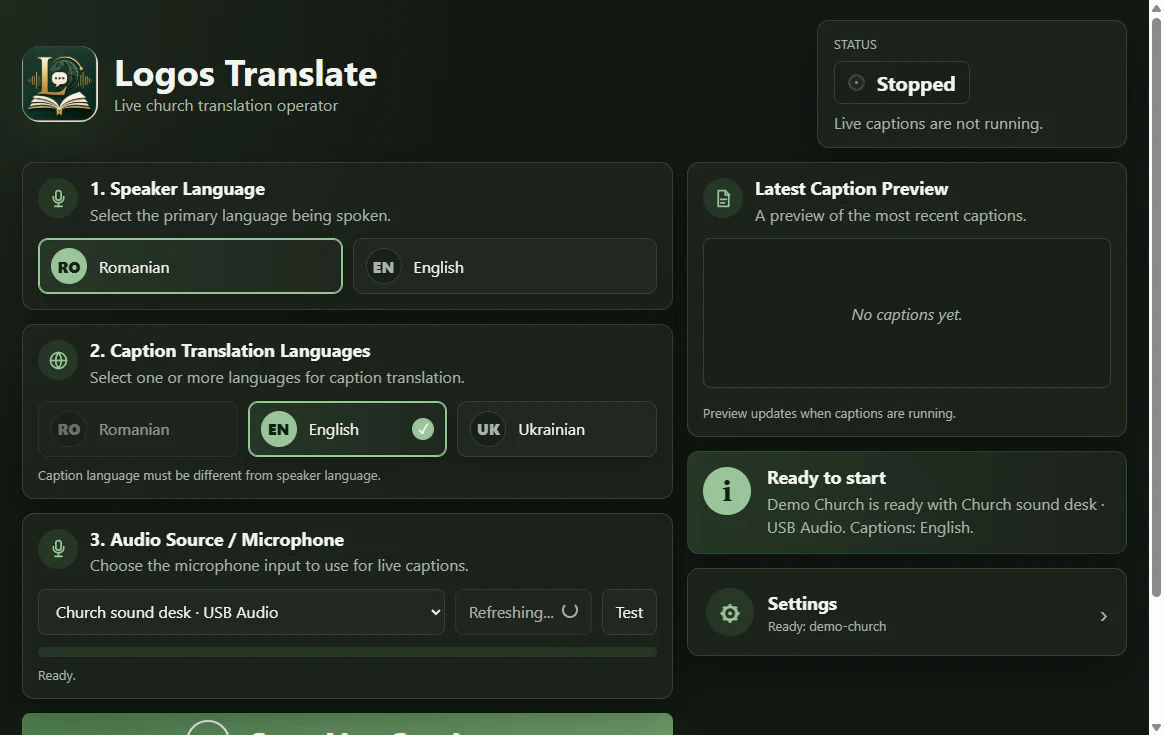
Everything needed to start a service.
Choose the church, audio input and languages, check that everything is ready, then start live captions.
One spoken message.
Clear in every
language.
People open the church link and follow the same live message in the language they understand best.
Source: English
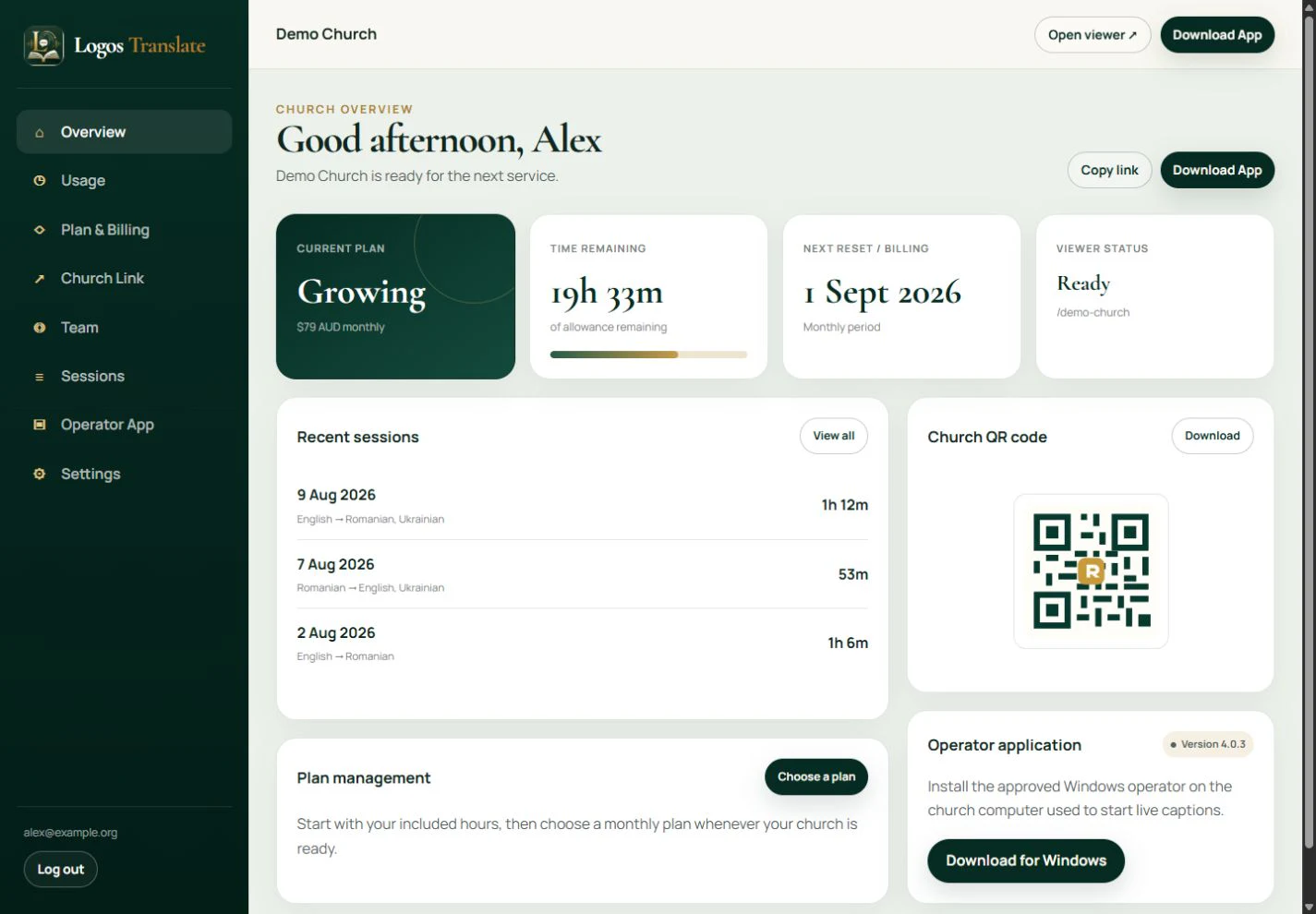
Your church settings and usage in one place.
Church administrators can see remaining hours, plan information, billing, viewer link, QR code and recent sessions.
Displays
Bring live translation to every screen.
Show live translated captions in your broadcast with Broadcast Overlay, or present them full-screen on a projector or display.
Broadcast Overlay
Add live translated captions to a livestream or production software using a browser source.
Works with OBS Studio, vMix and other software that supports browser/web sources.Projector
Let the room follow the message on a full-screen display. New captions gently roll upward while recent context stays visible.
The display uses captions already created for the live session.Churches using Logos Translate
Helping more people understand the Word.
Hear from churches and members using Logos Translate during real services.

At Philadelphia, we were searching for a way to serve our non Romanian speaker members. After exploring many options, we chose Logos Translate because of their church-focused approach, accuracy of translation, and the affordability that makes this possible for a church. Logos Translate has allowed us to extend the reach of our ministry in meaningful and sustainable ways.
I moved from Uganda a couple of months ago, and came to a Romanian church as I felt more connected, and welcomed here. The problem was I don't understand Romanian at all, but Logos Translate helps every service to understand the word of God in a language I understand especially their audio translation.
I have been going to my local church for a while, but as a English speaker it was quite hard to gain some spiritual growth in church as the language was different. Logos Translate has helped me to understand the Word of God and draw closer to Him!
Why Logos
Built differently for churches.
Church translation shouldn’t require enterprise complexity or enterprise pricing. See how Logos Translate compares with other live translation platforms.
| Feature | Logos TranslateBUILT FOR CHURCHES | Other live translation platforms |
|---|---|---|
| Church-optimised translation | Built specifically for churches, with church-focused terminology and translation context |
Many are designed primarily for meetings, conferences and general events |
| Pricing | From A$0 in months with no billable Flex usage, or fixed plans from A$25/month |
Pricing varies widely and can increase with usage, languages, participants or additional features |
| Translation included | 1 translated language included with paid fixed plans |
Translation may be an add-on, separately metered, or charged per target language |
| Unlimited viewers | No per-viewer charge |
Some platforms use participant limits or participant-based plans |
| App needed for viewers? | No. Open the church link or scan a QR code in any modern browser |
Browser access is available on some platforms; others use apps for certain features |
| Translated audio | Natural translated audio available directly to listeners |
Available on some platforms, sometimes through separate plans, apps or usage charges |
| How audio is charged | Charged only when translated audio is actually generated, per language — not per listener |
Charging models vary; some meter AI audio/translation by language, minute or plan |
| Sermons & worship songs | Designed for complete church services — including sermons, Scripture, prayer and worship songs |
General-purpose platforms may require additional configuration for church terminology and worship content |
| Livestream + projector | Built-in Broadcast Overlay + Projector Display for OBS, vMix, ProPresenter and browser-source workflows |
Display features exist on several platforms, but availability and pricing vary |
| Recurring Sunday use | Reusable church link + QR code — members don’t need a new setup every Sunday |
Workflow varies by platform and may be structured around individual meetings/events |
| Free trial | 4 free hours. No credit card required. |
Free trials vary by provider and may have participant, feature or time limits |
Compared with platforms such as CaptionKit, SYNAI Connect, Wordly and LiveVoice. Features and pricing vary by provider. Comparison based on publicly available information.
Pricing for different church rhythms
Start free. Choose fixed or Flex when you are ready.
Try 4 hours of live source-language captions. Fixed plans begin at A$25 per month for predictable regular use. Flex is A$0 when unused and charges measured usage in months you use Logos Translate.
Sunday
5 hours
Growing
30 hours
High-Use
80 hours
Flex
Pay for what you use
Paid use includes source captions in 60 languages, one simultaneous translated target and unlimited viewers. Audio Translation is A$0.07 per generated translated-audio minute per language.
Live translation explained
Helpful technology with high accuracy
Logos Translate uses automated speech recognition and machine translation to create live captions and translated text. Like all AI-generated language tools, captions and translations can contain mistakes or delays, but we have received very high feedback from users claiming very high accuracy of translation.
Clear, high quality audio help produce better results.
Questions churches usually ask.
How does live church translation work?
Connect your church sound system to the Windows or macOS Operator app, choose a supported speaker language and the translation languages needed for this service, then start the session. Logos Translate turns speech into live captions and, on a paid plan, translated text. Your congregation opens the church link or scans its reusable QR code.
Do viewers need to install an app?
No. Viewers open the church’s reusable link in a modern browser on their own phone, tablet or computer. No viewer account is required. The church operator uses the Windows or macOS Operator app and an internet connection.
Does the Operator app work on Windows and Mac?
Yes. Logos Translate Operator is available for Windows and macOS. Install it on the computer connected to your church audio. On Mac, Logos Translate will ask for microphone access the first time it needs your audio input.
Are viewers unlimited?
Yes. The number of people reading captions does not change fixed-plan or Flex charges. Each viewer still needs a reliable internet connection.
What languages are currently supported?
Choose from 60 supported languages for source captions and translation. Prices are the same regardless of the languages selected. Choose languages in the Operator app for each service; capacity is not tied to permanent language assignments.
Does it work with our existing church audio?
Use an audio input connected to your Windows PC or Mac, such as a normal USB audio interface or compatible digital mixer feed. Check the input meter and preview captions before the service. A clear speech feed and stable internet help; room noise, music and overlapping speakers can reduce accuracy.
Do we need a credit card for the free trial?
No. A new eligible church receives 4 hours of source captions in any of the 60 supported languages to use within 30 days. The standard trial does not include translation or translated audio and does not automatically start a paid subscription.
Contact
Have a question about Logos Translate?
Tell us about your church and what you need help with.
Help more people follow the message.
Create your church workspace and begin with 4 free hours of live source captions in any supported language.
No card required to start.